How to set up your bot
Four steps, about two minutes. Once it’s live, the AI checks every race ~2.5 minutes before the jump and posts any matching pick to your own private Discord channel.
- 1
Link your Discord (one-time)
No Discord yet? Make a free account at discord.com or in the app first. Then tap “Connect Discord” on the Build your bot page (or inside the builder). Discord opens and asks you to authorise Punt Legacy. Check it’s the account you use on your phone, then press Authorise. You’ll come straight back here, and we add you to the Punt Legacy server automatically, so there’s no invite link needed.
- 2
Clone or build a bot
Hit Clone on any bot on the leaderboard (or build your own). The builder pops up with its settings filled in. Tweak anything, give it a name. Cloning doesn’t start anything by itself; the bot only goes live when you press Launch.
- 3
Press “Launch bot”
We create a private channel just for that bot. Only you can see it. A “bot is live” message lands there straight away.
- 4
Get signals before each race
About 2.5 minutes before a race, any runner matching your bot is posted to the channel (💰 money-back / 🎁 bonus / 🏇 straight). Turn on Discord notifications for that channel so you don’t miss one.
Where your bot lives in Discord
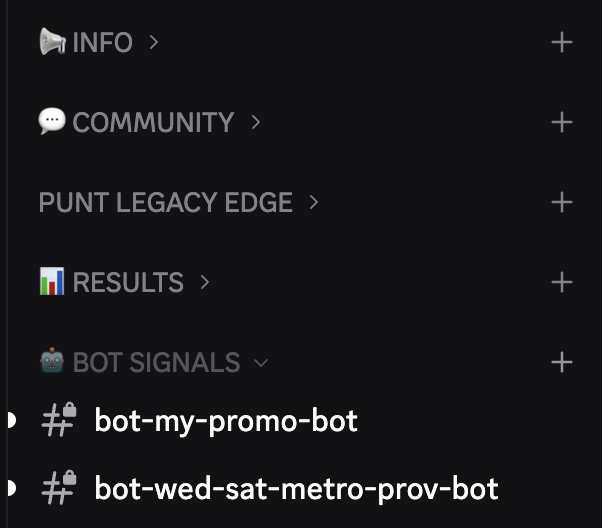
Open the Punt Legacy server and scroll to the bottom, to 🤖 BOT SIGNALS. Each bot you launch gets its own 🔒 private channel called bot-your-bot-name. Only you can see it.
On mobile: tap the Punt Legacy icon in the server list on the left, then scroll down.
Not working?
I pressed Clone and nothing happened▾
Clone opens the bot builder on top of the page, already filled in. Scroll to the bottom of it and press “Launch bot”. Cloning on its own doesn’t start anything. If the builder asks you to connect Discord, do that first. It brings you back with the bot still filled in.
I launched it but can’t find the channel▾
Open Discord, tap the Punt Legacy server, and scroll right to the bottom to the 🤖 BOT SIGNALS category (tap it to expand). Your channel has a 🔒 and is called bot-<your bot name>. Make sure you’re logged into the same Discord account you connected. On the Build your bot page there’s also an “Open in Discord” button next to each of your bots.
My channel is there but no signals are coming through▾
Signals only arrive when a runner matches your bot’s filters, about 2.5 minutes before the race, so a strict bot (e.g. Wed/Sat only) can be quiet for a while. Press 🧪 Test next to your bot on the Build your bot page to send a sample signal. If that arrives, everything is working.
My phone doesn’t ping me▾
In Discord, long-press your bot channel → Notification settings → All messages. Also check Discord notifications are allowed in your phone’s settings.
Do I need a particular plan?▾
Anyone can design and back-test a bot for free. Launching one so it sends live signals needs Ultimate Plus or Unlimited.
Still stuck? Use the chat bubble on the site, or message us in the Discord. 18+. Gamble responsibly.